File request software

File request software for structured client requests

File request software gives you a defined way to ask clients for files and keep track of the request as they respond.

FileTRX is designed for professionals who need more structure than a basic upload link, without turning file collection into a full client portal. Create a checklist of files, answers and confirmations, share one browser-based request, and see what has arrived and what is still outstanding.

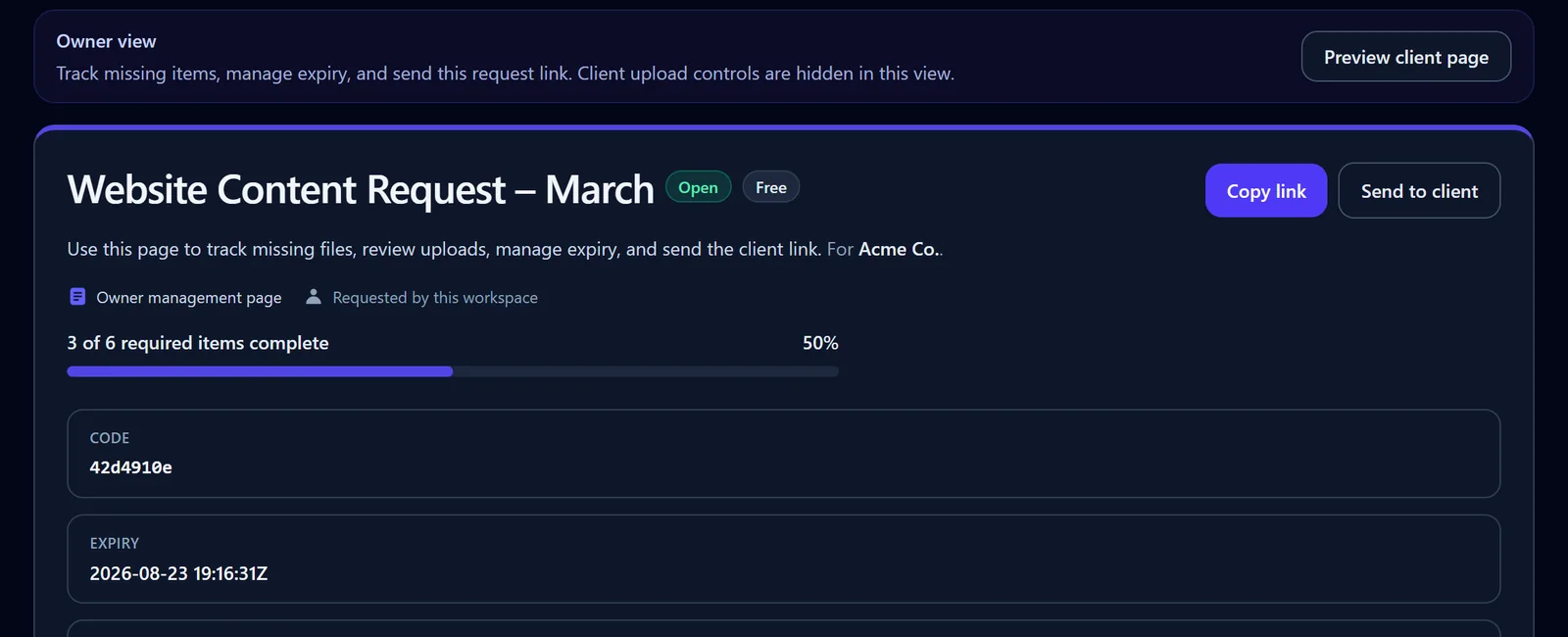
FileTRX owner view showing the Website Content Request at 50 percent completion

A structured request keeps progress and outstanding work visible.

Category explained

What is file request software?

File request software helps you ask another person for specific files and collect them through a defined request.

At the simplest end of the category, a file request may be little more than an upload link connected to a folder. That can be exactly what you need when the job is simply: “send me these files”.

Structured file request software goes further. It lets you define the individual items you need, keep files and related information together, and track completion against the request rather than only seeing which files landed in a folder.

That difference becomes useful when:

  • you need several specific files from the same client
  • some items may arrive before others
  • you also need an answer, date, choice or confirmation
  • the request repeats for different clients
  • you need to see what is still missing
  • you want a clearer request lifecycle than an email thread provides

FileTRX is built for that structured-request layer.

Buyer checklist

What should good file request software let you do?

The right software depends on your workflow. Before comparing feature lists, check whether the product solves the actual collection problem you have.

  1. 01

    Define each requested item separately

    A request should make it clear what you need. If you are asking for six documents, it is usually more useful to show six requested items than to provide one blank upload box and a paragraph explaining what belongs there. Separate items also make partial completion easier to understand.

  2. 02

    Give the client a practical response experience

    The client should be able to understand the request without needing a training session. Look for a clear browser-based experience that shows what has been requested, what is required and what has already been completed. For open FileTRX requests, the client can respond without creating a FileTRX account.

  3. 03

    Collect information as well as files

    Many real client requests contain more than documents. You may need a date, a short explanation, a yes or no answer, a choice from a list or confirmation that the supplied information is current. A useful file request tool should let the request reflect the response you actually need.

  4. 04

    Support partial completion

    Clients do not always have everything available at once. Good file request software should cope with a request being partly complete rather than treating the whole request as simply open or finished.

  5. 05

    Show what is still missing

    Receiving files is only part of the job. The more important question is often: What am I still waiting for? A structured request should make completed and outstanding items easy to distinguish.

  6. 06

    Reuse recurring request structures

    If you ask different clients for the same type of information, rebuilding the request every time is unnecessary. Reusable templates or saved request structures can make recurring collection work more consistent.

  7. 07

    Support follow-up on incomplete requests

    When requests remain outstanding, follow-up becomes part of the workflow. FileTRX supports scheduled reminder emails for outstanding requests.

  8. 08

    Let you manage the request lifecycle

    Requests change. You may need to close a request, reopen it, revoke it or extend its expiry. File request software should give the owner enough control to manage the request rather than treating the link as permanent and unchangeable.

  9. 09

    Make limits and pricing understandable

    Check the practical limits that affect your use case, such as request limits, file size, expiry and which workflow features belong to which plan. Do not choose a product based only on the longest feature list. Choose one whose limits and workflow fit the way you actually collect files.

  10. 10

    Avoid paying for a broader platform unless you need one

    Some organisations genuinely need approvals, internal assignments, signatures, case records, large integration ecosystems or a full client portal. Others do not. If your main problem is requesting files and information from clients and tracking what remains outstanding, focused file request software may be the better fit.

Category spectrum

Three levels of file collection software

Not every product in the “file request” category solves the same problem.

1

Basic upload request

Best when you need

A place for someone to upload files

Typical focus

Upload destination

Useful when the main question is: Where should the client put the files? Storage platforms and file-transfer products can be a good fit for this.

Where FileTRX fits 2

Structured file request software

Best when you need

Specific requested items, partial completion and visible outstanding work

Typical focus

Request checklist and progress

Useful when the question changes to: What exactly have I requested, and what is still outstanding? A request can contain individual files, answers and confirmations.

3

Broader document workflow or client portal

Best when you need

Approvals, collaboration, signatures, case records or wider client operations

Typical focus

End-to-end workflow

Appropriate when file collection is only one part of a larger client or operational process. FileTRX is not intended to replace those broader systems.

From request to completion

How FileTRX works

  1. 1. Create a structured request

    Start with the client request you actually need to complete. Add individual checklist items rather than relying on one generic upload area.

  2. 2. Add files, questions and confirmations

    A FileTRX request can combine file uploads with other response types, so the request can capture the supporting information needed alongside the files.

  3. 3. Share one browser-based request

    Send the client one request link. For open requests, the client can use the request without creating a FileTRX account.

  4. 4. Let the client respond

    The client works through the requested items and can provide files and other requested information through the same request.

  5. 5. Track completion and outstanding items

    As required items are completed, FileTRX shows request progress. You can see which requested items are complete and which remain missing.

  6. 6. Manage the request

    The request owner can manage the request through its lifecycle, including closing, reopening, revoking or extending it when needed.

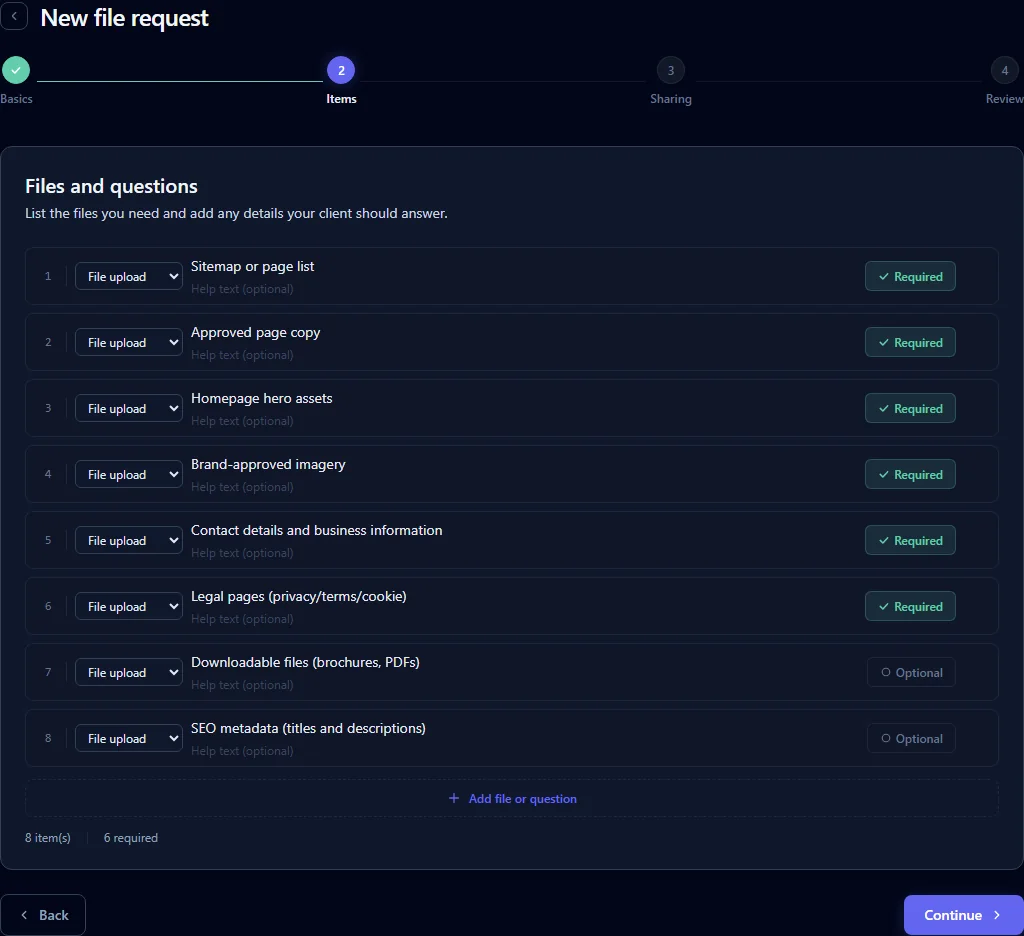
FileTRX request builder with eight structured file items and required or optional states
Define the individual files and questions needed for the request.

What can you request with FileTRX?

A structured client request can contain different types of items depending on what you need back.

File uploads

Request a specific file or document as its own checklist item. Where needed, a file item can accept multiple files.

Short and long text answers

Collect supporting information that would otherwise arrive in a separate email or message.

Yes or no questions

Useful when the client needs to confirm a simple condition before the request can be considered complete.

Dropdown choices

Provide a defined list of options when a free-text answer is unnecessary.

Dates and confirmations

Collect a relevant date or ask the client to confirm something explicitly, such as whether the information supplied is the latest available.

File requirements

For file items, accepted formats and file-size rules can be configured where relevant. FileTRX is not positioned as a full form builder.

Progress that reflects reality

Track partial completion instead of treating every request as all-or-nothing

A real client request is often completed in stages.

The client may provide an agreement, contact information and a date today, then return with the remaining files later.

The useful state is not simply “request sent”. It is:

3 of 6 required items complete.

FileTRX tracks required and optional items and shows request progress so the owner can see what has arrived and what is still missing. Requests can move through not-started, in-progress and completed states as the required work changes.

FileTRX owner progress view showing three of six required items complete
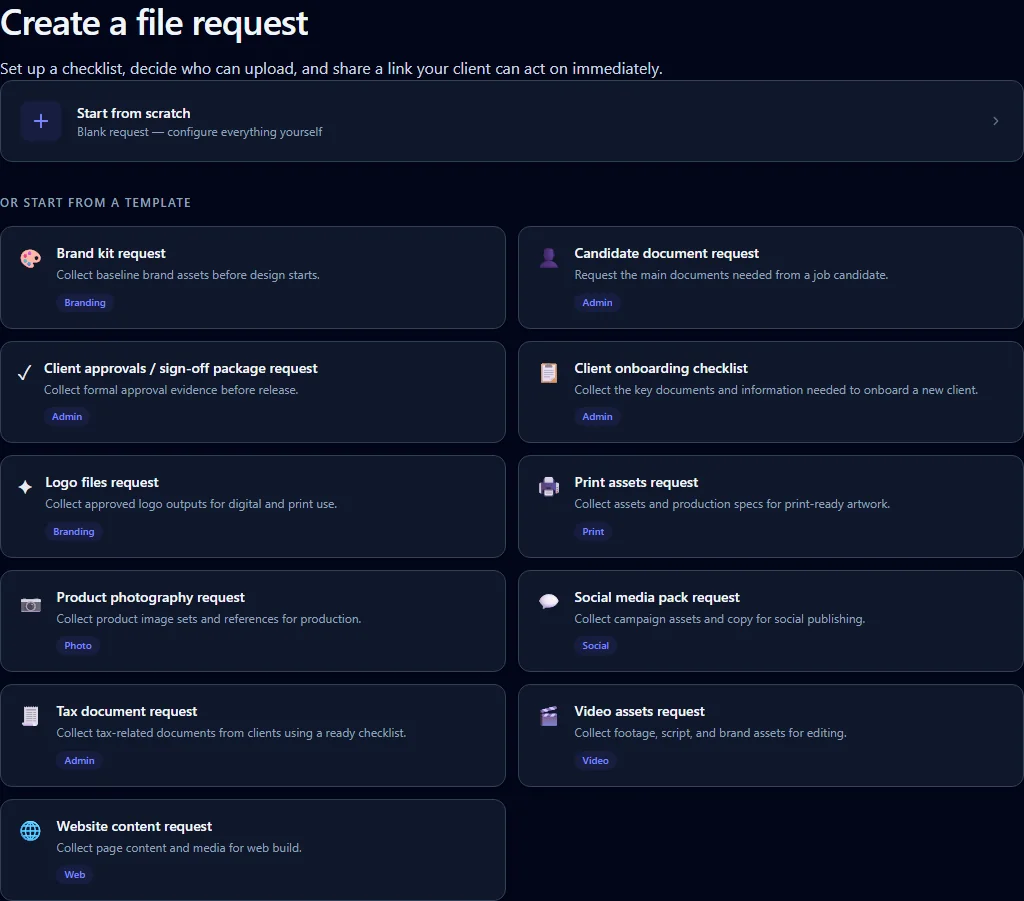
FileTRX template selection with ready-made request templates

Repeatable workflows

Reuse recurring requests instead of rebuilding them

Many professional file requests follow a repeated structure.

An accountant may ask different clients for similar year-end records. An agency may repeatedly collect brand assets and page content. A recruiter may ask candidates for the same supporting documents and information.

FileTRX includes ready-made request templates and lets you save your own recurring request structures. That means a useful request can become a repeatable starting point rather than something rebuilt from the beginning every time.

FileTRX also supports scheduled reminder emails for outstanding requests, helping recurring collection workflows keep moving without changing the underlying checklist.

One defined request

What does the client experience look like?

For an open FileTRX request, the client receives a browser-based request and does not need to create a FileTRX account.

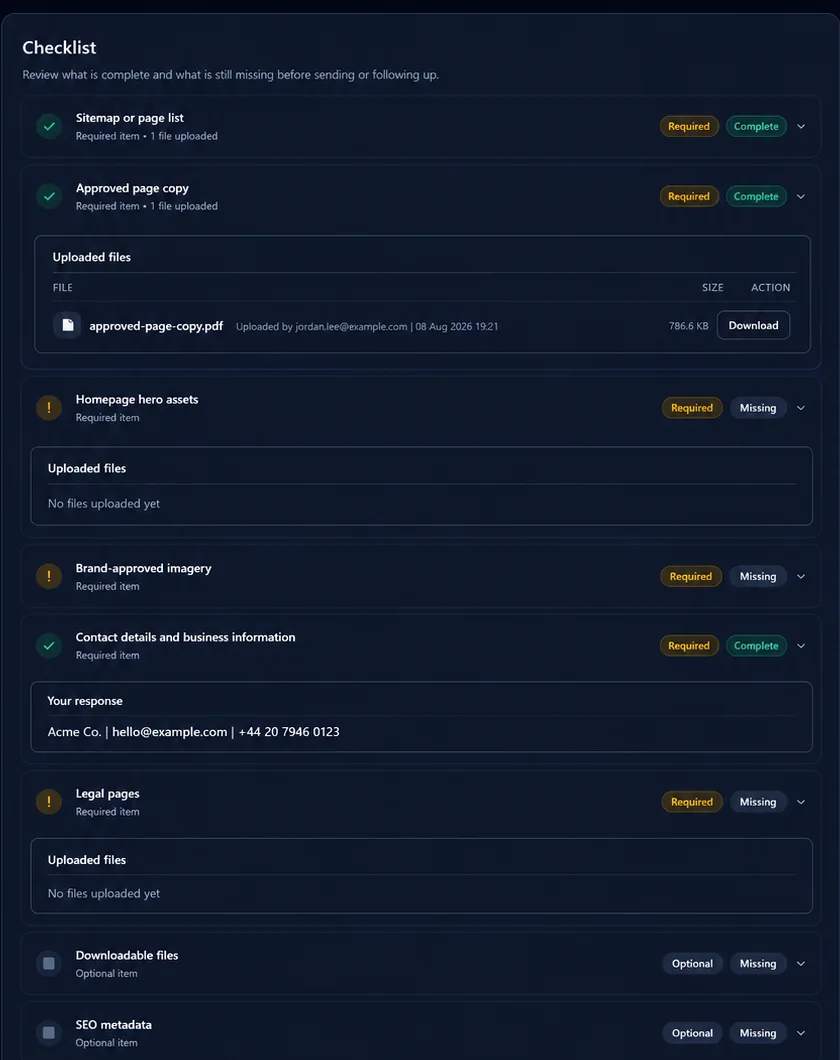
Instead of landing in a blank folder, the client can see the individual files or pieces of information being requested.

Depending on the request, that can include required and optional items, item-specific instructions, file upload fields, questions or choices, dates, confirmations and visible completion state.

The request can remain partly complete while the client works through the outstanding items.
Client-facing FileTRX checklist showing complete and missing requested items

Where FileTRX fits

FileTRX is focused on one part of the client workflow:

requesting files and information in a structured way, then tracking the request until the required items are complete.

A good fit when you want

  • ✓ more structure than a blank upload link
  • ✓ a checklist of specific requested items
  • ✓ files and supporting information in the same request
  • ✓ partial-completion tracking and visibility of missing items
  • ✓ reusable request structures and reminder support
  • ✓ owner-side request management

A broader platform may be more appropriate for

  • internal team assignments
  • approval workflows
  • e-signatures
  • live cloud-storage sync
  • a large integration ecosystem
  • broader client or case records and full document management

The important question is not which product has the most features. It is which level of software fits the workflow you actually need. If you are still choosing the right collection method, read our guide on how to request files from clients.

Focused file request software

File request software without unnecessary complexity

If file collection is already a clearly defined part of your work, adding a full client platform can create more setup than the problem requires.

FileTRX keeps the core workflow focused: Create the request → share it → collect the response → track what remains → manage completion.

You can start with a straightforward request and add reusable templates, reminders, branding and other supported workflow features as your collection process becomes more repeatable.

Frequently asked questions

What is file request software?

File request software is software used to ask another person for one or more files and provide a defined way for them to respond. Structured file request software can also track individual requested items, partial completion and outstanding work rather than simply providing an upload destination.

How is file request software different from file sharing?

File sharing usually starts with files you already have and need to send or make available to someone else. File request software starts with files or information you need someone else to provide to you.

The two workflows can exist in the same product category, but they solve different directions of exchange.

Is file request software the same as a client portal?

Not necessarily.

File request software can be focused specifically on collecting requested files and information. A client portal usually covers a broader ongoing relationship and may include areas such as messaging, records, approvals, signatures, project information or other client services.

If structured collection is the main problem, a focused request tool may be enough.

Do clients need an account to upload files?

For open FileTRX requests, no. The client can open the request in a browser and respond without creating a FileTRX account. FileTRX also has other request access modes, so this statement applies specifically to open requests.

Can file request software collect answers as well as documents?

Some products can. FileTRX requests can combine file uploads with short or long text answers, yes or no questions, dropdown choices, dates and confirmations. This is useful when the files need supporting information as part of the same request.

Can I track which requested files are still missing?

Yes. FileTRX tracks completion against the request checklist, including required and optional items, so the owner can see overall progress and which requested items remain outstanding.

Can I reuse file request templates?

Yes. FileTRX includes ready-made templates and allows owners to save recurring request structures for reuse.

Are automatic reminders available?

FileTRX supports scheduled reminder emails for outstanding requests. Reminder behaviour should be used as follow-up support rather than treated as a guarantee that every client will respond.

What should I look for when choosing file request software?

Start with the workflow rather than the feature count.

Check whether the product lets you define individual requested items, supports partial completion, makes outstanding items visible, gives clients a practical response experience, handles any non-file information you need, supports recurring request structures and has limits and pricing that fit your use case.

Then decide whether you also need broader capabilities such as approvals, team collaboration, signatures or integrations. If you do, a larger document workflow or client portal product may be more appropriate.

When is a Dropbox or OneDrive file request enough?

A storage-native file request can be enough when your main requirement is to give someone a place to upload files into the storage system you already use.

Structured file request software becomes more useful when you need to define several requested items, collect supporting information, track partial completion or clearly see what is still outstanding.

When do I need a broader document workflow or client portal?

Consider a broader platform when file collection is only one part of a larger operational process and you also need capabilities such as internal assignments, approvals, signatures, extensive integrations, wider client records or full document-management workflows.

If the main problem is structured collection and tracking, a focused file request tool may be sufficient.

Choose the level of file request software that fits your workflow

If you need more than a blank upload link but do not need a full client portal, FileTRX gives you a structured way to request files and information, share one request and track what remains outstanding.