For accountants and bookkeepers

Client document collection for accountants and bookkeepers

Collecting client records is rarely difficult because of one missing file. The difficulty starts when a request contains several documents, some arrive now, others arrive later, and the supporting answers are spread across email threads, messages and folders.

FileTRX gives accountants and bookkeepers a structured way to request client documents and supporting information. Create a checklist, share one browser based request, track what is complete and what is still missing, and reuse the same request structure for recurring client work.

FileTRX is designed to support the document collection part of your workflow. It does not replace your accounting, tax or practice management software.

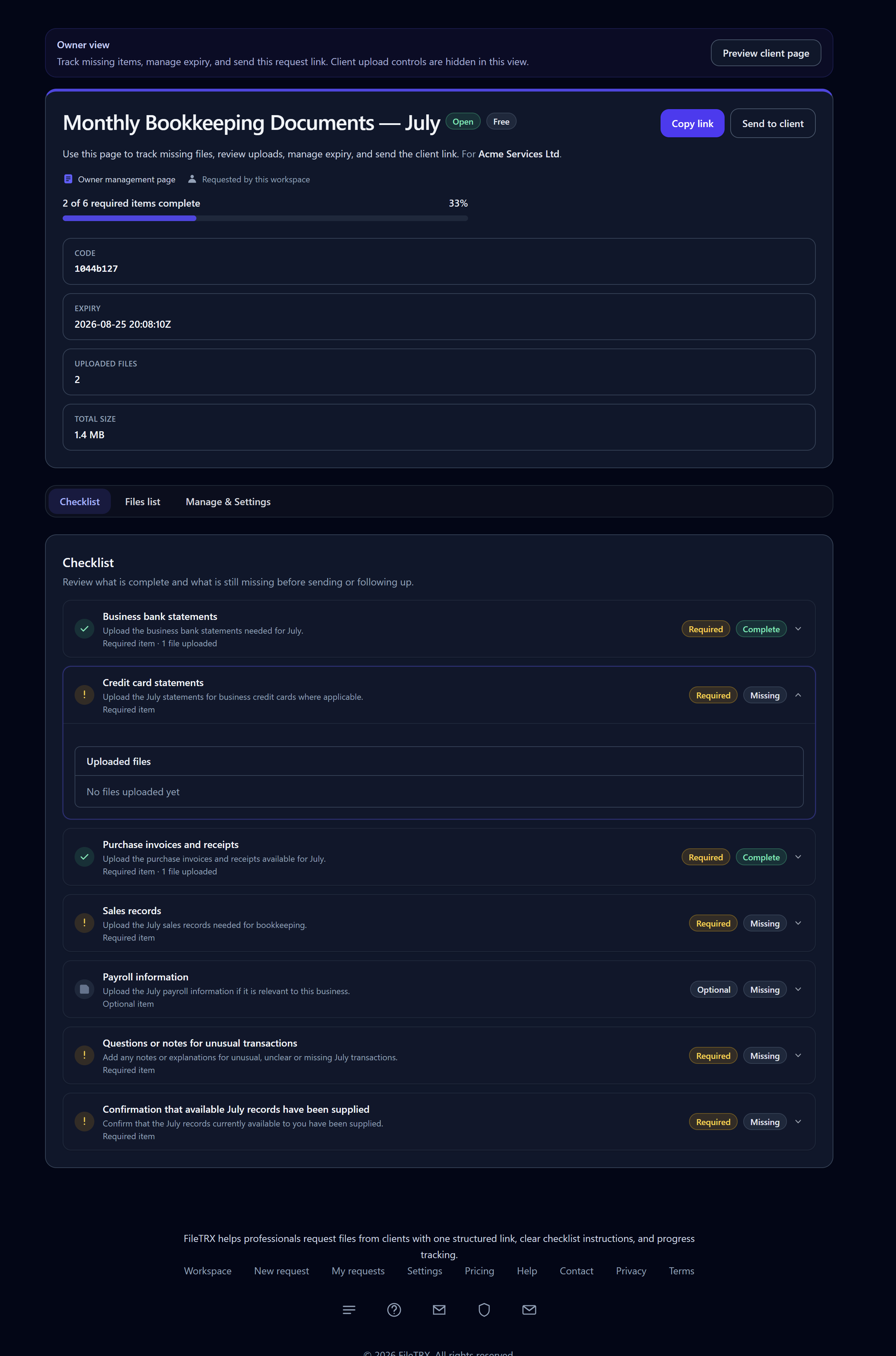
FileTRX owner view of a monthly bookkeeping request showing completed and missing client document items
Monthly bookkeeping request with partial completion and the outstanding items still visible.

The collection problem

Why accounting document collection becomes difficult

A simple request can often be handled by email.

The process becomes harder when the work depends on several separate items.

For example, a client may send their bank statement immediately but provide receipts later. Payroll information may come from another person. A supporting explanation may arrive in a separate email. A missing transaction may require a follow up question before the bookkeeping or accounts work can move forward.

The collection problem is no longer simply:

Did the client send something?

It becomes:

Which exact items have arrived, which are still outstanding, and what information do we still need?

That is where a structured request can help.

Four common accounting document collection workflows

Different engagements require different information. The examples below are intentionally general and should be adapted to the work your firm is actually carrying out.

01

New client onboarding

A new client request might include:

  • Existing accounting records
  • Previous period reports or returns where relevant
  • Business and contact information
  • Details of the accounting or bookkeeping system currently used
  • Relevant accounting dates
  • Confirmation that the supplied records are the latest available

The purpose is not to create one universal onboarding checklist. It is to give the client one clear request containing the documents and information your firm needs for that engagement.
02

Monthly bookkeeping

Recurring bookkeeping work often involves the same categories of information each month.

  • Business bank statements where required
  • Credit card statements
  • Purchase invoices and receipts
  • Sales records where applicable
  • Payroll information where applicable
  • A question asking about unusual or missing transactions

A request can remain partially complete while the client works through the outstanding items. Instead of rebuilding the list each month, a useful request structure can be saved and reused.

03

Year end or tax document collection

Year end and tax related work often requires a larger set of records.

Rather than placing a full checklist on this page, FileTRX can support a dedicated reusable request for the exact year end records your firm needs.

A future FileTRX year end accounts template can provide a more detailed starting point for items such as banking records, income records, expense records, asset information and relevant confirmations.

Exact requirements vary by client, entity, accounting period and the work being performed.

04

An ad hoc accounting query

Not every request is a large recurring checklist. Sometimes you need one supporting document plus some context.

Supporting document
Upload the invoice, statement or agreement related to this query.
Explanation
Please explain what this transaction relates to.
Relevant date
Provide the date connected to the transaction or event.
Confirmation
Confirm that the document supplied is the latest available version.

This is one reason structured requests can be more useful than a blank upload link. The file and the supporting information remain part of the same request.

What can a structured accounting client request contain?

A FileTRX request can combine different item types depending on what you need from the client.

File uploads
Request a specific document as its own item. An individual file item can also accept multiple files when several documents belong together.
Text answers
Collect a short explanation or a longer supporting note alongside the requested documents.
Yes or no questions
Use a simple confirmation where a free text response is unnecessary.
Dropdown choices
Give the client a defined set of options when that makes the request clearer.
Dates and confirmations
Collect a relevant date or ask the client to confirm something explicitly.
Required and optional items
Separate information that must be supplied from items that are useful only when applicable.

File items can also use accepted format and file size rules where relevant. FileTRX is not a full accounting form builder. These item types exist to support structured client document and information requests.

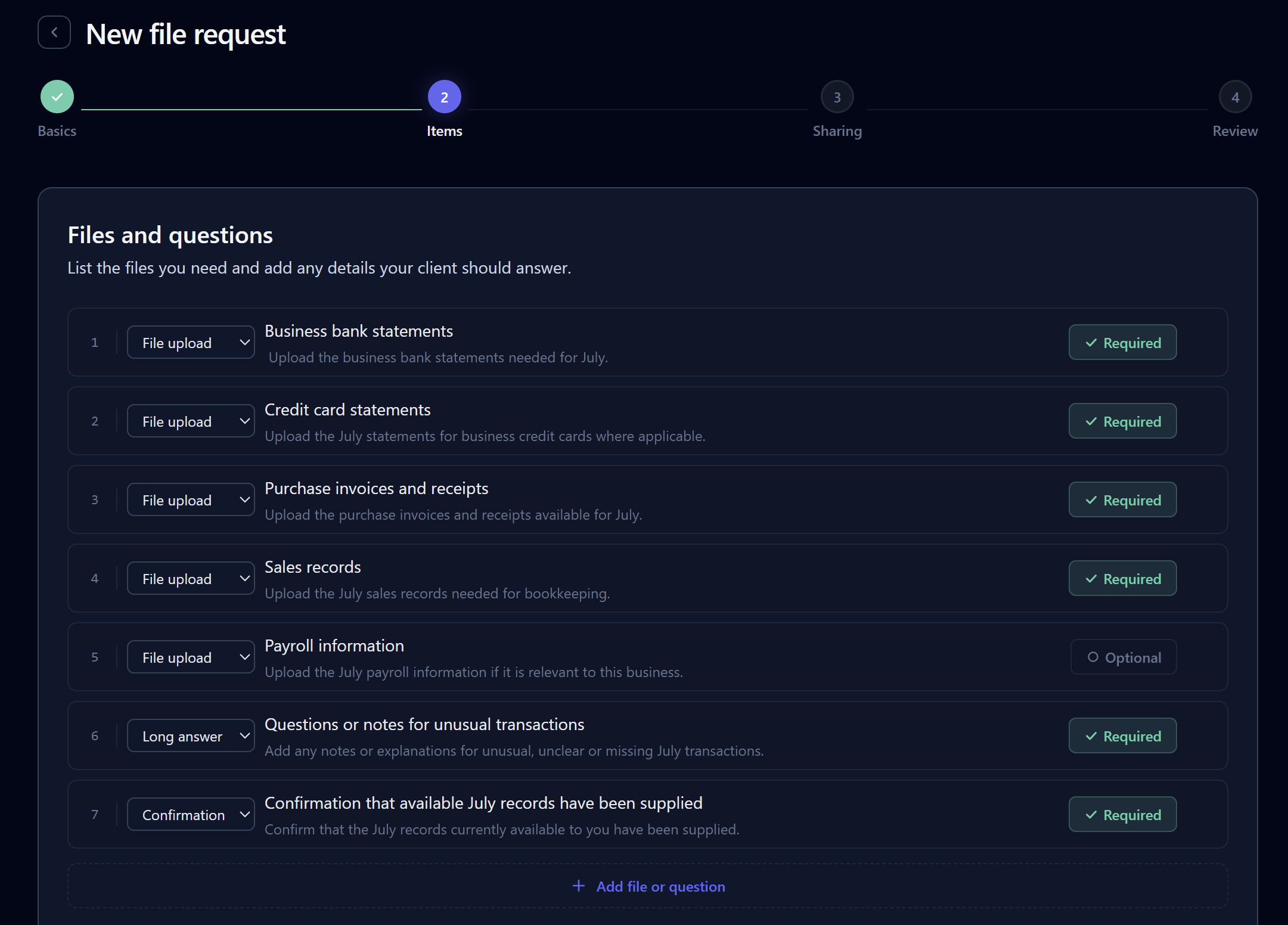
FileTRX request builder listing accounting file uploads, a long text question and a confirmation item
Build the request from individual files, questions and confirmations.

See what has arrived and what is still missing

Accounting work often cannot proceed simply because one or two important records remain outstanding.

A structured request makes those gaps visible.

The useful state is

4 of 6 required items complete

rather than simply “files received”.

FileTRX tracks required and optional items and can show which requested items are complete and which remain missing. Requests can move through not started, in progress and completed states as clients respond.

Reuse recurring accounting requests

Many accounting and bookkeeping workflows repeat.

Monthly bookkeeping is the clearest example, but the same idea can apply to onboarding, quarterly record collection, year end preparation and recurring client queries.

FileTRX includes ready made templates and lets you save your own recurring request structures.

That allows a useful request to become a repeatable starting point rather than something rebuilt for every client.

FileTRX also supports scheduled reminder emails for outstanding requests.

The request still needs to match the individual client and engagement, but the underlying structure does not have to start from zero each time.

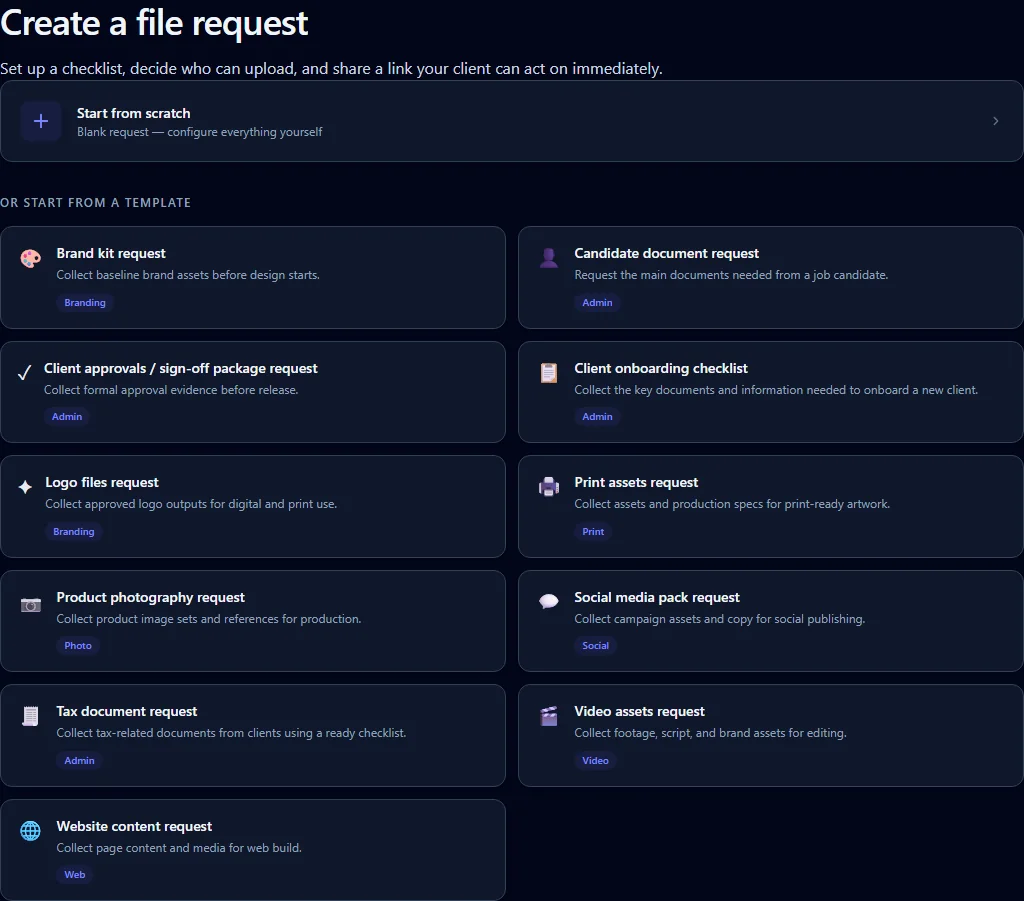
FileTRX template selection screen for starting from a reusable request structure
Choose a ready made template or reuse a request structure saved by your firm.

What does the client see?

For an open FileTRX request, the client can use the browser based request without creating a FileTRX account.

Instead of receiving a paragraph asking for several unrelated documents, the client sees the individual items being requested.

  • Files to upload
  • Required and optional items
  • Instructions for individual items
  • Questions, dates and confirmations
  • Visible completion state

The client can respond in stages when everything is not available at once.

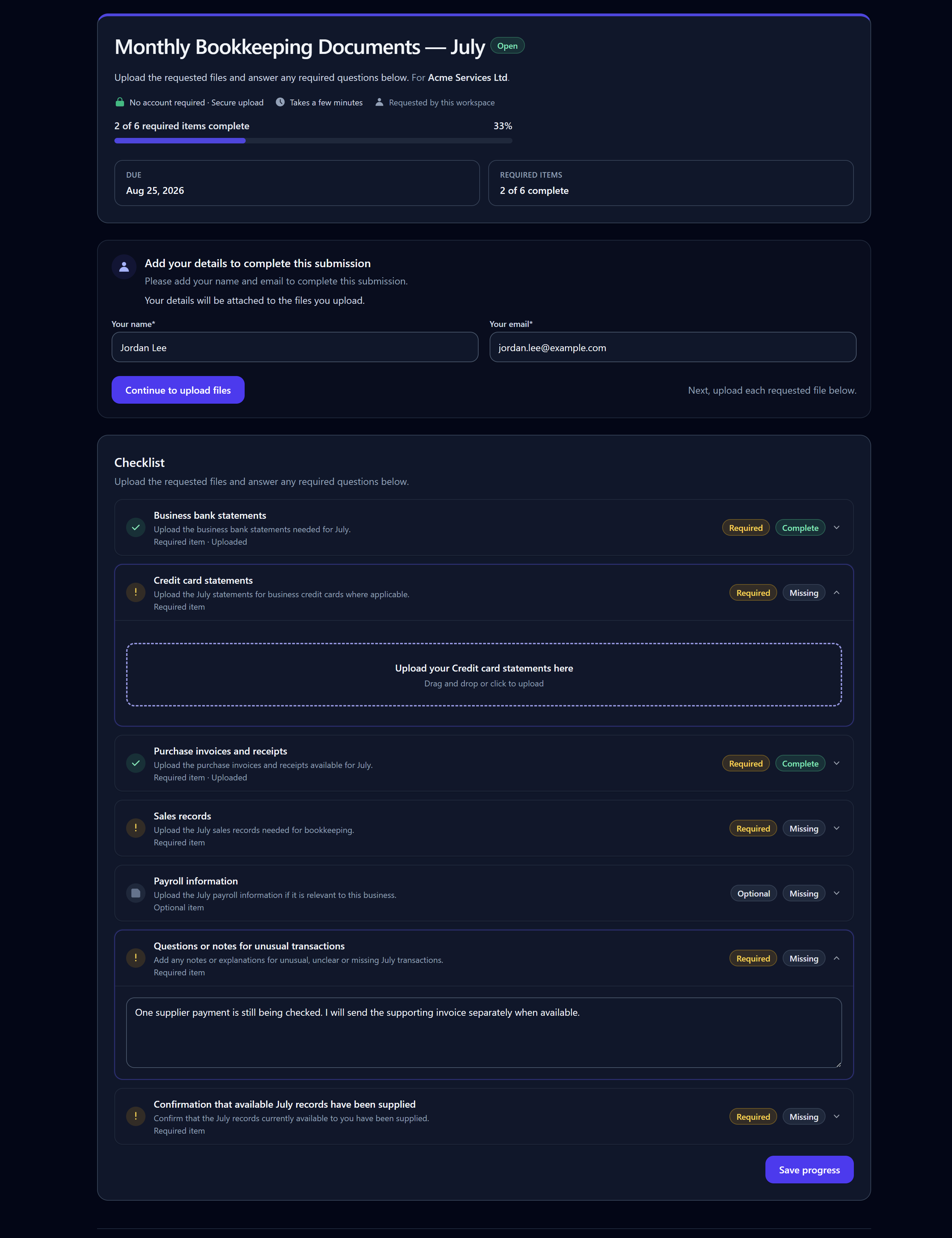
Client-facing FileTRX monthly bookkeeping request with completed and outstanding checklist items
The client sees the requested items and can return as information becomes available.

FileTRX alongside your existing accounting software

FileTRX is focused on structured client document collection. That means it can make sense when your firm already has accounting, bookkeeping or practice software but still needs a clearer way to request client records and supporting information.

FileTRX may be a good fit when you need:

  • A defined checklist for each client request
  • Individual requested document items
  • Files and supporting answers in the same request
  • Partial completion tracking
  • Visibility of outstanding items
  • Reusable request structures
  • Reminder support
  • Owner side request management

A broader accounting platform may be more appropriate when you need:

  • A full client relationship management system
  • Internal team assignments and workload management
  • Job pipelines
  • Tax calculation or filing
  • Client billing
  • E signatures
  • Document approval workflows
  • A permanent document management system
  • Deep accounting software integrations

FileTRX should complement the tools already used for those wider functions rather than pretend to replace them. If you are comparing the narrower product category, see the file request software guide.

A practical checklist for clearer accounting document requests

  1. 01

    Name the work clearly

    Use a request title the client will recognise, such as “July bookkeeping records”, “New client accounting information” or “Year end records for 31 March”.

  2. 02

    Separate each requested item

    If several documents are required, list them separately instead of hiding the whole request inside one paragraph.

  3. 03

    Make the accounting period clear

    Specify the relevant month, quarter, year or accounting period when that matters.

  4. 04

    Distinguish required and optional items

    Do not make clients guess whether every item applies to them.

  5. 05

    Ask for context when the document alone is not enough

    Include questions about unusual transactions, missing records or accounting treatment beside the relevant request rather than relying on a separate email thread.

  6. 06

    Keep outstanding items visible

    Partial completion is normal. A useful request should make the remaining work easy to identify.

  7. 07

    Reuse request structures that already work

    If your firm asks for the same type of records regularly, turn the checklist into a reusable request structure.

  8. 08

    Request only what the engagement actually requires

    Templates should be a starting point, not a reason to ask every client for unnecessary information.

Accounting request templates

Year end accounts document request

Templates can turn a recurring accounting process into a useful starting point. The first planned accounting template is a practical request structure for collecting common year end records from clients.

The detailed template will live on its own page so it can provide a useful checklist without turning this industry page into one long year end article.

This template page is planned and is not yet published. Future accounting templates may include recurring monthly bookkeeping document requests where search demand and product usage justify them.

Start with the document collection workflow you actually need

You do not need to replace your accounting software to make client document requests more structured. If the problem is knowing what you asked for, what has arrived and what is still outstanding, FileTRX gives you a focused request workflow for that part of the job.

Frequently asked questions

How can accountants collect documents from clients?

The right method depends on the size and frequency of the request. Email can be enough for a simple one off request. A structured request becomes more useful when several documents or pieces of information are required, some items may arrive later, or the same process repeats across different clients. FileTRX lets accountants create a checklist based request, share one browser based link and track completion against the requested items.

What is document collection software for accountants?

Document collection software helps accounting professionals request and receive client records in a more organised way. Focused collection software typically centres on requested items, uploads, progress and follow up. Broader accounting platforms may also include practice management, client records, billing, workflows, e signatures and document management. FileTRX focuses on the structured collection part of that workflow.

Can clients upload without creating a FileTRX account?

For open FileTRX requests, yes. The client can use the browser based request and upload files without creating a FileTRX account. FileTRX also has other request access modes, so the no account statement applies specifically to open requests.

Can I request answers as well as files?

Yes. A FileTRX request can combine file uploads with short or long text answers, yes or no questions, dropdown choices, dates and confirmations. This can be useful when a requested document needs an explanation or when the firm also needs information that does not belong in a file.

Can I see which client documents are still missing?

Yes. FileTRX tracks completion against required and optional request items so the request owner can see overall progress and identify which items remain outstanding.

Can I reuse the same request for monthly bookkeeping?

You can save and reuse recurring request structures in FileTRX. A monthly bookkeeping request can therefore start from an existing structure and then be reviewed or adjusted for the current client and period.

Can FileTRX replace accounting practice management software?

No. FileTRX is focused on requesting, collecting and tracking client files and supporting information. It does not replace broader practice management capabilities such as job pipelines, internal workload management, billing, tax preparation or a complete client relationship management system.

Does FileTRX integrate with Xero, QuickBooks or other accounting systems?

FileTRX does not currently provide live accounting software integrations that should be marketed as part of this page. It can be used as a separate structured document collection workflow alongside the accounting or practice software your firm already uses.

What documents should I request for year end accounts?

The exact documents depend on the client, entity, accounting period and the work your firm is carrying out. A detailed FileTRX year end accounts document request template is planned to provide a practical starting checklist without presenting it as universally complete.

Is FileTRX a client portal for accountants?

FileTRX provides browser based client request pages, but it should not be described as a full accounting client portal. Its current focus is structured file and information collection rather than broader client records, messaging, billing, workflow or practice management.

Make recurring client document requests easier to track

Create a structured checklist, share one request and keep the outstanding items visible as your client responds.